

Download RAR Extractor Free – Fast, Secure File Decompression Tool
Overview
RAR Extractor Free is a lightweight, free file extraction utility developed by Qing Qing Yu. Designed for both novice and power users, the application focuses on quick and reliable decompression of a wide range of archive formats. While its name highlights RAR support, the tool also handles ZIP, Gzip, Tar, BZip2, ISO, PKG, SWF, JAR, XIP, and many other common containers.
The program’s drag‑and‑drop interface eliminates the need for cumbersome navigation, allowing users to extract single files or entire folders with just a few clicks. For password‑protected archives, RAR Extractor Free prompts for the correct password and proceeds with extraction once validated, making it a practical choice for secure file handling. Although the app lacks a visual progress bar, it compensates with fast extraction speeds that often complete within seconds, even for large archives.
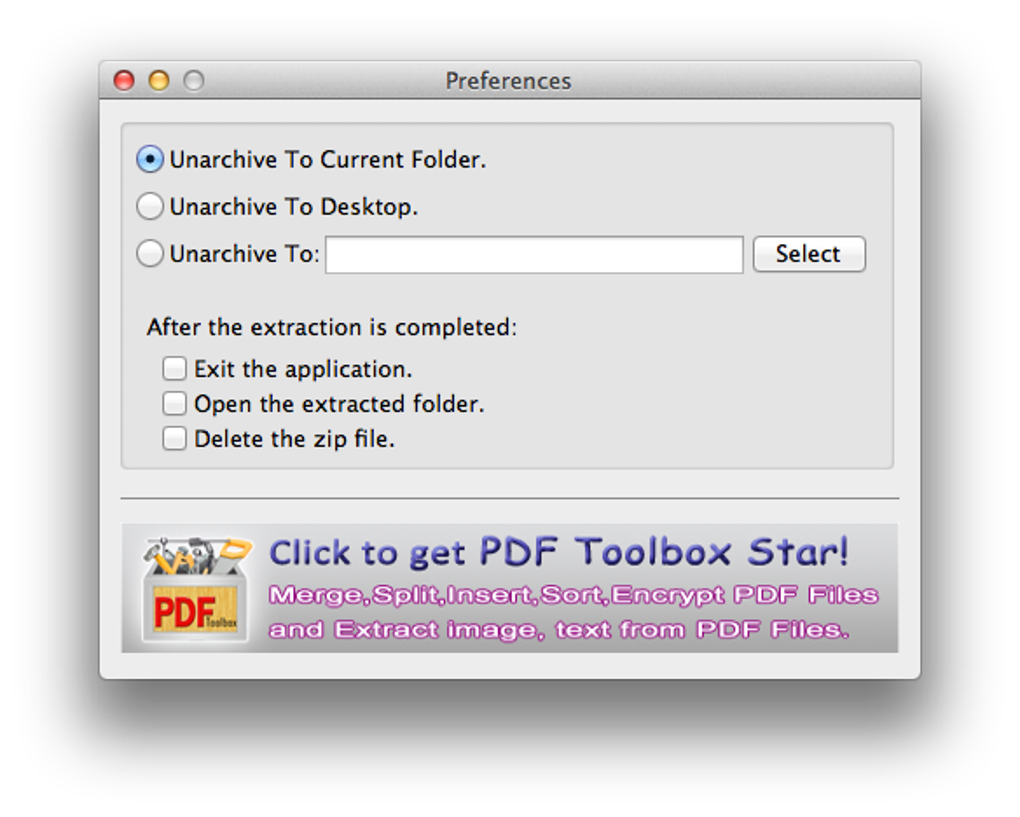
The user interface stays in the background, freeing up screen real estate for other tasks, while a customizable Preferences window lets you define default extraction locations, post‑extraction actions, and automatic cleanup options. Overall, RAR Extractor Free offers a straightforward, ad‑supported solution for everyday archive management without charging a dime.
Key Features & Benefits
- Supports multiple archive formats: RAR, ZIP, TAR, Gzip, BZip2, ISO, PKG, SWF, JAR, XIP, and more.
- Drag‑and‑drop extraction for quick batch processing.
- Handles password‑protected archives when the correct password is supplied.
- Customizable extraction destination: same folder, desktop, or user‑specified path.
- Post‑extraction automation: auto‑open files, delete original archives, or exit the app.
- Background operation allows multitasking while files are being decompressed.
- Free of charge with optional in‑app advertising.
Pros
- Completely free with no hidden licensing fees.
- Fast extraction speeds that rival paid competitors.
- Broad format compatibility reduces the need for multiple utilities.
- Simple UI ideal for users of all skill levels.
- Customizable preferences give control over file handling after extraction.
Cons
- Absence of a visual progress bar can leave users uncertain about long extractions.
- Banner advertisements occupy a noticeable portion of the preferences pane.
- No built‑in archive creation feature; the tool only extracts.
- Limited error reporting; users must open extracted files to confirm success.
- Only available for desktop operating systems, no mobile version yet.
Installation, Usage & Compatibility
Getting started with RAR Extractor Free is straightforward. Follow these steps to install and begin extracting files:
Installation Steps
- Visit the official download page and click the “Download for Windows” button (or the macOS link if you are on a Mac).
- Run the installer executable. The wizard will guide you through standard installation prompts – accept the license agreement, choose an installation folder, and click “Install”.
- Once installation completes, launch the application from the desktop shortcut or start menu.
How to Extract Files
- Drag the archive file (e.g., a .rar, .zip, or .tar) onto the main window. For batch extraction, select multiple files and drop them together.
- If the archive is password‑protected, a dialog will appear requesting the password. Enter the correct password and confirm.
- Choose the extraction destination in the Preferences pane or let the app use the default location (same folder as the archive).
- Click “Extract”. The app will run in the background; you can continue working while the extraction proceeds.
- When extraction finishes, optional actions such as opening the extracted folder, deleting the original archive, or exiting the program will execute based on your preferences.
RAR Extractor Free is compatible with Windows 10, Windows 11, and macOS 10.13 or later. The application takes advantage of native system libraries to ensure stable performance across supported platforms. While a Linux version is not officially released, many users run the Windows build via compatibility layers such as Wine, though functionality may vary.
FAQ, Review & Final Verdict
Can RAR Extractor Free handle large archives over 4 GB?
Yes, the tool supports large archives, but extraction speed depends on your hardware and available RAM. For very large files, ensure you have sufficient disk space in the destination folder.
Is there any limit to the number of files I can extract at once?
No hard limit exists. You can drag‑and‑drop multiple archives for batch extraction, though extremely large batches may slow down processing as the app runs in the background.
Does the free version include any hidden fees or trial periods?
No. RAR Extractor Free is completely free to download and use. The only monetization comes from banner ads displayed in the preferences pane.
Can I extract encrypted archives without the password?
The application requires the correct password to decrypt protected archives. It does not provide any password‑recovery or cracking features.
Is there a way to disable the advertisement banner?
The free version does not offer an ad‑removal option. Users seeking an ad‑free experience must consider a paid alternative.
RAR Extractor Free delivers on its promise of fast, straightforward archive extraction. Its support for a broad range of formats and the ability to handle password‑protected files make it a versatile addition to any PC toolkit. While the lack of a progress indicator and the presence of banner ads are notable drawbacks, the overall performance and zero‑cost model outweigh these minor inconveniences. For users who need a reliable extractor without a subscription, this tool is a solid choice.
Conclusion & Call to Action
In summary, RAR Extractor Free stands out as a fast, secure, and completely free solution for decompressing a variety of archive types on Windows and macOS. Its drag‑and‑drop workflow, customizable extraction settings, and support for password‑protected files address the core needs of everyday users. Although the UI could benefit from a progress bar and the ad banner occupies some visual space, the overall value remains high, especially for those looking to avoid paid alternatives. Ready to streamline your file management? Download RAR Extractor Free now and start extracting with confidence.







